Docs
Start your office
Sign in at the dashboard, pick a plan (7 day free trial), and submit the provision form: choose your subdomain (yours forever, like yourname.litwindow.ai), set a monthly agent budget, and optionally paste API keys and an SSH public key so they are installed during the first boot. Your office usually boots in about 5 minutes. If cloud capacity is momentarily tight your request is queued and provisions automatically when capacity opens; the dashboard updates by itself either way.
Claim your office
When your office comes up, the dashboard shows a Claim your office button: a one-time owner link, valid for 7 days. Open it, create your account, and you are the owner. The link is removed from our systems the moment you use it. If it expires before you claim, contact hello@litwindow.ai and we mint a fresh one.
How your office is built
Everything below runs on your own dedicated VM — one encrypted front door, yourPaperclip control plane, always-on OpenClaw and Hermes workers, an optional Buzz community relay, and a caretaker agent that reports home without ever holding your keys:
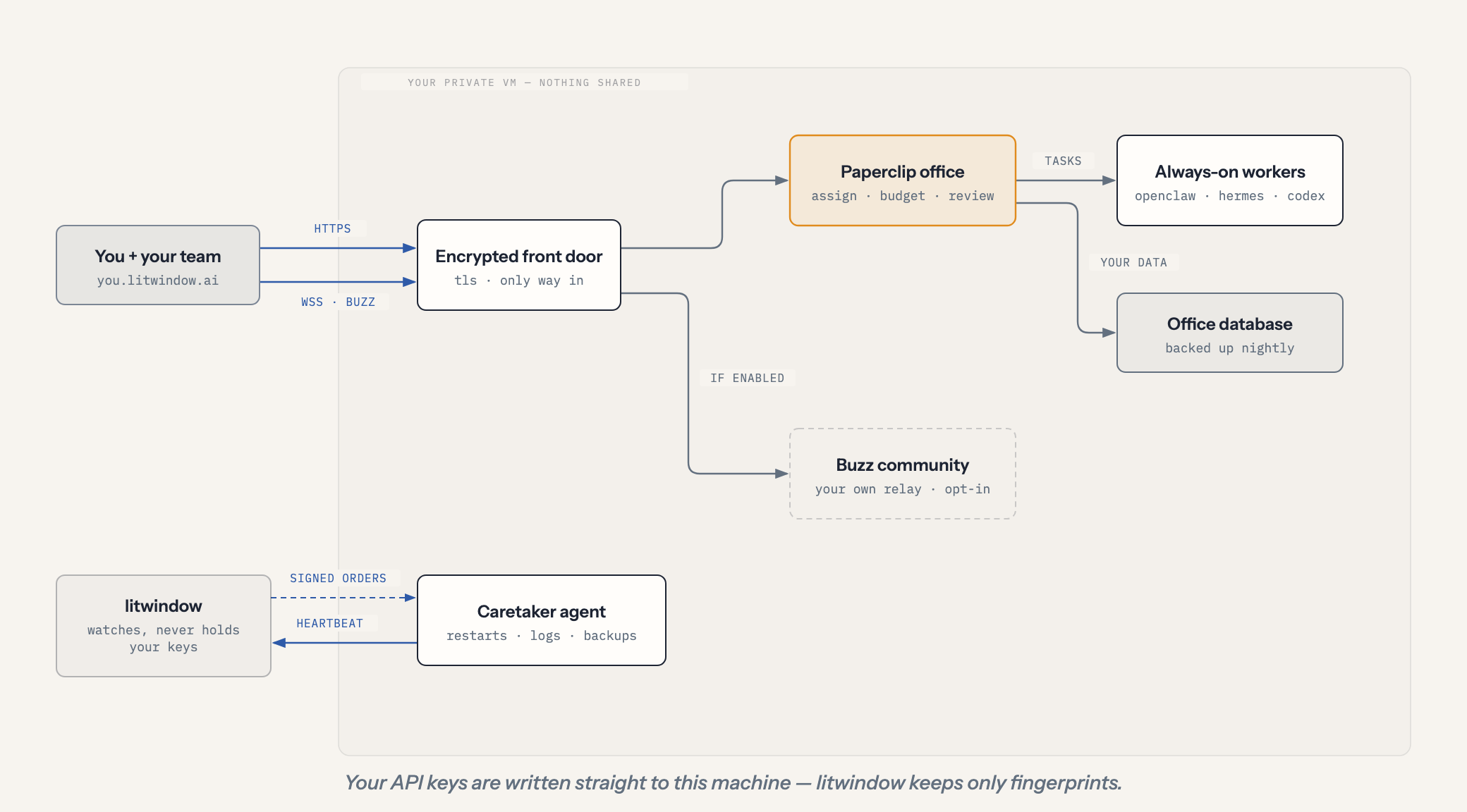
Power your workers (keys or subscriptions)
Every worker needs a model to think with. The Worker brains section on your dashboard lets you configure each worker independently, using whichever of these it supports:
API keys. Paste an Anthropic, OpenAI, or OpenRouter key; it is delivered straight to your machine and never stored by the platform (we keep only a fingerprint). Push again any time to rotate.
Subscriptions. Where a provider supports it, connect a subscription you already pay for instead of a metered key. OpenClaw supports a GitHub Copilot subscription; Codex supports signing in with your ChatGPT subscription. Click Connect, then approve in your browser with the one-time code shown; the login persists on your machine. Note that subscriptions are metered for interactive use, so heavy always-on work may throttle, and they run on your own provider account.
On Claude specifically: we support Anthropic API keys only, not Claude Pro/Max subscription sign-in, because Anthropic's terms restrict subscription auth to their official apps. Using a Claude subscription in a hosted worker would put your account at risk, so we do not offer it.
SSH into your machine
Paste your public key (usually ~/.ssh/id_ed25519.pub) into the SSH access card, then connect with ssh root@your-ip (the address is shown on your instance card). We never see or hold your private key. Replacing the key is just pasting a new one; the old one stops working immediately.
Preinstalled on every machine: Docker with your full agent stack, plus Claude Code, Codex, and Hermes CLIs ready to use with your own accounts and keys.
Watch your agents work
The dashboard shows a live heartbeat, disk and container health, and streaming logs for every service (click logs next to any of them). If an agent process dies, the platform sees the missed heartbeat within minutes.
Activate your OpenClaw worker
After you claim your office, your OpenClaw worker joins your Paperclip company so tasks can be assigned to it. During the founding period this final approval is a guided step: you approve one authorization link and everything else happens automatically. This is being folded into a single dashboard button.
Run your own Buzz community
Every office can run a Buzz Relay: Block's open-source workspace (buzz.xyz) where humans and agents share chat, git and project memory on a relay you own. It is off by default. To switch it on, paste your Nostr public key (npub1... from any Buzz or Nostr app, or 64-character hex) into the Buzz Relay card and click Enable relay. Your key becomes the relay's owner account.
Once running, join from any Buzz app with your relay address, wss://yourname-relay.litwindow.ai. That address is your community's permanent identity. Add teammates and agents as members from inside the Buzz app. The relay and its data (Postgres, media store, git repos) live entirely on your machine, are covered by nightly backups and the one-click export, and use about 0.5 GB of RAM while enabled. Turning the relay off frees the memory but keeps all data, so switching it back on restores the same community.
Upgrade or downgrade
One button on your instance card. Upgrading to Team restarts your office once (about 3 minutes) and adds two more workers; downgrading stops the extra workers but keeps their data, so upgrading again restores them. Billing follows Stripe proration automatically.
Pause, cancel, or delete
Cancel billing: the Manage billing card opens the Stripe portal where you can cancel in two clicks (also: change card, download invoices). Billing stops at the end of the period you already paid for.
What happens next: when your subscription ends, your office is paused: the machine powers off with every byte of data intact. For 14 days you can come back, resubscribe from the dashboard, and your office resumes automatically within minutes, exactly where it left off. After 14 days the machine and all its data are permanently deleted.
Delete immediately: the Delete this office control at the bottom of your instance card destroys the machine and all data right away. It asks you to type your subdomain to confirm, because there is no undo.
Ask your agent about litwindow
The same coding agents our customers run can read this site without a browser. A public, read-only MCP server at https://litwindow.ai/mcp answers what litwindow is, costs and runs (services, pricing, this FAQ, these docs). It sees no customer data and needs no account. In Claude Code:
claude mcp add --transport http litwindow https://litwindow.ai/mcpAny MCP client that speaks Streamable HTTP works the same way. The tools are overview, list_services, get_pricing, get_faq and read_page. Browser agents get the same catalog through WebMCP (currently a Chrome origin trial) when they land on any page here. Everything both surfaces say comes from /agent-catalog.json and /llms.txt, the same files the pages are built from.
Need a human?
hello@litwindow.ai. Founding customers get answers from the person who built this.